The Three Elements Your AI Analytics Copilot Needs to Be Accurate
Why analytics copilots fail without aligned Access, Instructions, and Context - and how combining them unlocks accurate, trustworthy AI analytics inside tools like Cursor, VS Code, and Cline.
The Three Elements Your AI Analytics Copilot Must Combine to Be Accurate
The silent failure most teams don’t see coming
Teams are rolling out AI analytics copilots in Cursor, VS Code, and Cline. They turn on Conversational BI, hook up Snowflake or BigQuery, write a few prompts-and expect the magic to happen.
But what they get is randomness dressed as intelligence:
- SQL that runs but doesn’t reflect the business
- Natural language answers that sound fluent but ignore rules
- AI agents that hallucinate definitions or misinterpret tables
- “Smart” copilots that produce wrong insights without warning
None of this is a model problem. It’s a context problem.
The difference between a copilot that responds and a copilot that’s right comes down to three interdependent components: Access, Instructions, and Context.
And the painful truth is this:
Each of them is useless on its own. Only the alignment of all three produces accurate analytics.
Why copilots fail: they’re missing at least one of the three pillars
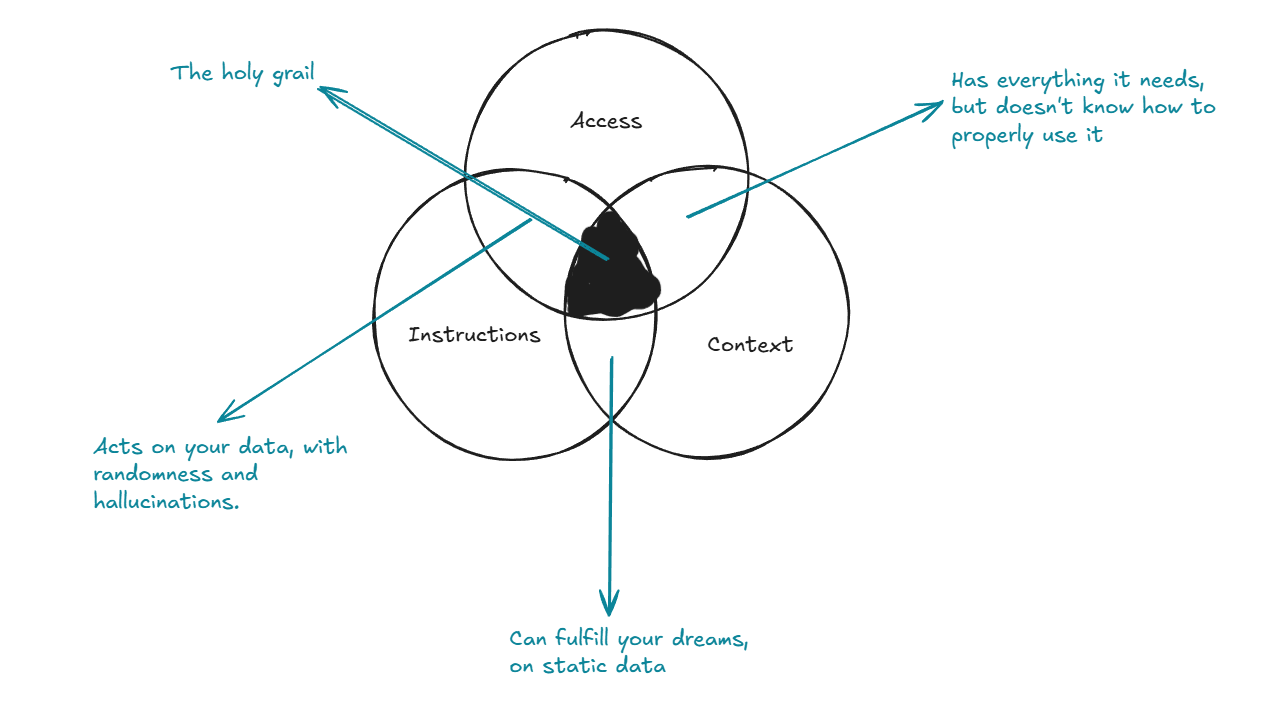
Here’s the entire story in one diagram:

This Venn diagram is the core of modern AI analytics and Conversational BI.
Access alone
Your copilot can query Snowflake, BigQuery, Redshift, Postgres- but without context, it misinterprets everything. SQL that runs ≠ SQL that’s right.
Instructions alone
You write detailed prompts and natural language queries… but without grounding, the copilot hallucinates confidently. Fluent answers, wrong conclusions.
Context alone (semantic models, documentation, definitions)
You have a semantic layer no one trusts. You have GitHub/dbt docs the agent can’t interpret. Knowledge exists, but nothing uses it correctly.
None of these layers works by itself. Quality only emerges when they tune each other.
The real unlock: alignment between the three
The key to reliable analytics copilots is not the components-it’s the interaction between them:
1. Instructions shape context
Clear, strict instructions tell the AI how to use context, not just what it is. They eliminate guessing and force adherence to your business rules.
2. Access enriches context
Live data from Snowflake/BigQuery turns static definitions into dynamic truth. RAG pulls schema, definitions, lineage, and documentation at the moment of analysis.
3. Context governs access
The semantic layer defines which tables, metrics, joins, filters, and time windows are valid. This prevents mismatches, leakage, incorrect joins, and hallucinated metrics.
When these three reinforce one another, AI analytics quality jumps by an order of magnitude:
- Correct SQL on first try
- Stable natural language query (NLQ)
- Business logic consistently applied
- Far fewer hallucinations
- Answers that match how your business actually works
This is the difference between “AI that talks” and AI that reasons.
Why this matters: it unlocks real IDE-based analytics workflows
When Access + Instructions + Context are aligned, you can finally move analytics into where teams already work:
- Cursor AI mode
- VS Code copilots
- Cline for automated workflows
Inside the IDE, something new becomes possible:
- The copilot retrieves definitions via RAG
- It understands your semantic layer
- It queries Snowflake/BigQuery with zero guessing
- It generates transformations, documentation, and tests
- It stays inside grounded context-no hallucinations
This is what AI-powered analytics looks like when it’s actually ready for production.
It’s not “prompting.” It’s not “autocomplete.” It’s context-aware analytical reasoning inside your development workflow.
Ignore this framework, and you get randomness
Teams that skip context alignment experience the same symptoms:
- “Why did the copilot join those tables?”
- “Where did this definition come from?”
- “Why is every answer slightly wrong?”
- “Why does NLQ feel unpredictable?”
Because context was never aligned with instructions and access.
Fix the context layer. Connect it to live data. Constrain the copilot through instructions.
And everything starts making sense.
Key Takeaways
- Access alone is not enough → SQL runs but is semantically wrong
- Instructions alone are not enough → fluent hallucinations
- Context alone is not enough → knowledge with no application
- Alignment of all three is what turns AI copilots into reliable analytics partners
- This alignment enables real, grounded Conversational BI and AI analytics inside IDEs like Cursor, VS Code, and Cline
The path forward
Start small:
- Pick one business domain
- Align Access + Instructions + Context
- Validate accuracy gains
- Expand to other domains
- Integrate the workflow directly into your IDE
When you do this, analytics stops being a guessing game and becomes decision-grade AI-augmented reasoning.