Mastering the Context Window: How to Reduce AI Hallucinations and Optimize the Analytics Workflow
A practical guide to mastering the AI context window for Analytics teams. Discover how agentic orchestration reduces engineering lead time by 50% and ensures high-fidelity results in the 2026 ROI-driven AI landscape.
Stop Fighting Context Bloat: The Agentic Workflow for Analytics Teams
TL;DR
To avoid the "context bloat" that leads to AI hallucinations and wasted tokens, analytics leaders should move away from long, single-session chats. By implementing a Plan → Agent → Sub-Agent workflow in IDEs like Cursor, teams can reduce engineering lead time by 30-50% and ensure enterprise-grade accuracy.
One of the most common challenges we've discussed in recent workshops is managing the context window during complex data analytics. In the "AI ROI Reckoning" of 2026, enterprise leaders can no longer afford the "95% problem"—the high failure rate of AI pilots due to poor data quality or model drift.
When a chat session in your IDE (like Cursor) gets too long, the model begins to lose focus. It gets bogged down by previous error logs, discarded code snippets, and irrelevant noise. The result? Hallucinations, higher token costs, and slower deployment.
To bridge the gap between technical potential and operational reality, we utilize a specialized "Context Orchestration" workflow. Here is the step-by-step guide to doing it right.
The Problem: Why "Context Bloat" Kills ROI
Think of the AI's context window as an analyst's desk. If you pile every raw data log, failed query, and brainstorming note on that desk, there's eventually no room left for the final report.
In 2026, "narrow and deep" beats "broad and shallow." You need a clean desk to produce high-value intelligence.
The Solution: The Agentic Orchestration Workflow
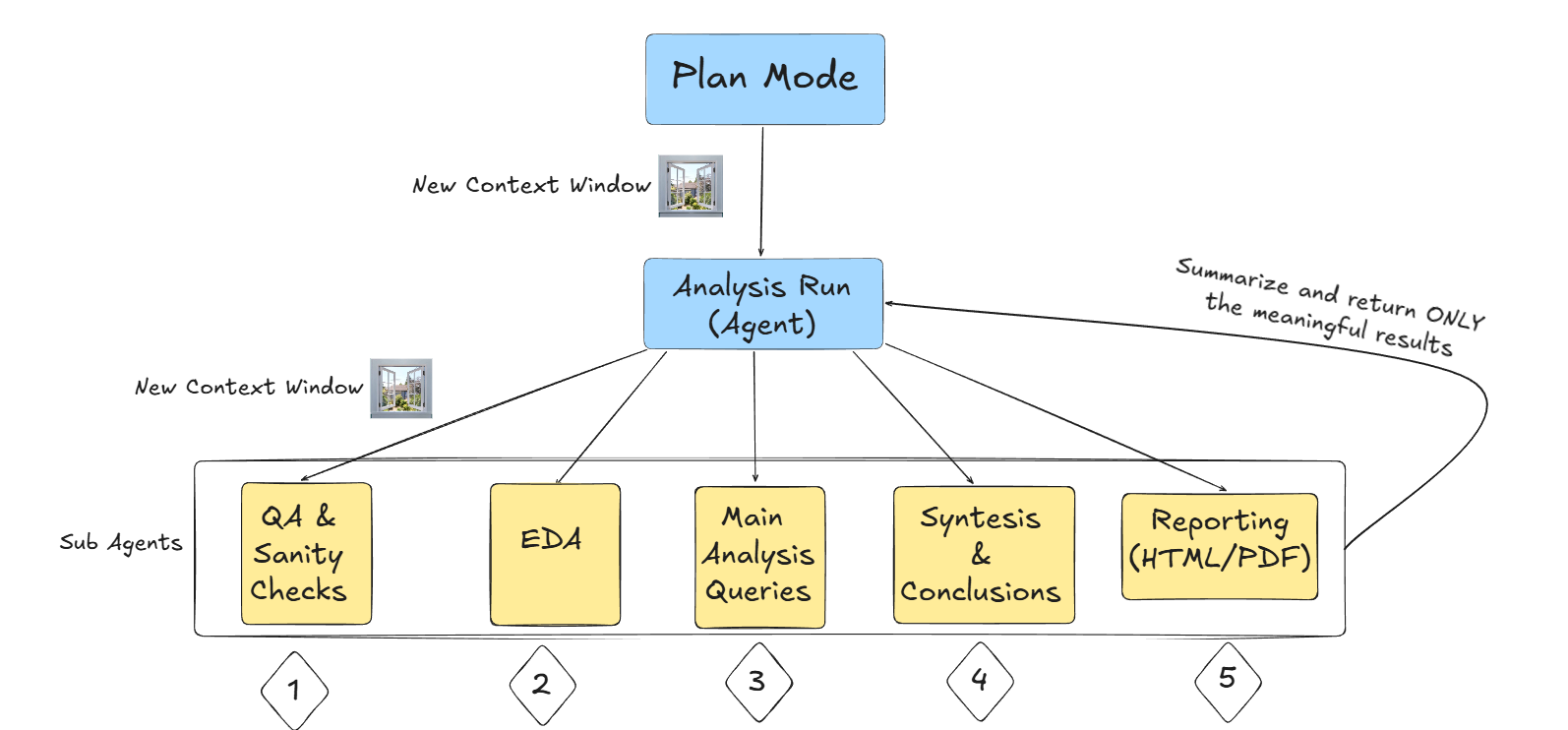
Follow this five-step cycle to keep your AI agents sharp, efficient, and cost-effective.
1. Plan Mode (The Strategy Phase)
Every analysis must start in Plan Mode. This is where the majority of the intellectual effort happens.
- Goal: Establish total clarity on process steps and optimized queries
- Action: Iterate with the AI to define the data schema, the logic of the join, and the success criteria
- Outcome: A structured "Analysis Roadmap" document
2. The Context Reset (The New Window)
Once the plan is finalized, stop the session. Opening a new context window (a fresh session) is the single most effective way to prevent hallucinations.
- The Move: Feed only the summary of the Plan into a new session
- Why it works: It forces the AI to focus on the execution without being distracted by the "trial and error" history of the planning phase
3. Agent Mode (The Orchestrator)
In the new window, switch to Agent Mode. The model now acts as your primary orchestrator.
- Action: The Agent follows the plan, executes the optimized SQL or Python, and saves intermediate results
- Benefit: Since the window is clean, the Agent follows instructions with much higher fidelity
4. Parallel Specialization (Sub-Agents)
For complex analytics, the primary Agent shouldn't do everything. You want to split the workload into Sub-Agents in separate sessions:
- The QA Sub-Agent: Handles sanity checks and data validation in a clean environment
- The EDA Sub-Agent: Conducts exploratory data analysis to find outliers without cluttering the main logic
- Context Control: This allows tasks like QA and EDA to run in parallel, significantly reducing total lead time
5. Summarization (Closing the Loop)
Once a Sub-Agent completes its specialized task, use the /summarize command.
- The Move: Bring only the meaningful results (the "signals") back into the primary Agent's session
- The Result: You reach the reporting phase with a high-density context window containing only verified truths
Why Is This Approach No Longer Optional?
By adopting this "Context by Design" approach, boutique teams can outperform massive Global Systems Integrators (GSIs). While junior associates at larger firms often let AI sessions run until they break, our agentic workflow ensures:
- Token Efficiency: You aren't paying for the model to re-read 10,000 lines of error logs
- Reduced Hallucinations: By "resetting" the desk, the AI doesn't confuse past mistakes with current goals
- Scalability: This process can be documented and turned into an AI Health Audit or a repeatable Readiness Template
Is your data team ready for the next wave of Labor Transformation? Stop fighting with your IDE and start orchestrating your agents.
Explore the Agentic Workflow Workshops or the variety of Service packages.